
If the idea of a 1 day month-end sounds unrealistic, you’re not wrong.
It’s how many of the teams we talk to feel, especially if your month-end currently takes 7–10 days.
So, what if we say the aim is not speed at all, it’s a structure that allows your team to avoid repetitive manual tasks and errors and instead spend that time on predictive modelling and strategy?
Let’s see what a One-day Month-End look like in practice.
What Is a One-Day Month-End Close?
A one-day month-end close means completing core financial reporting within one working day after period end.
Not by overtime or rushed work but rather by removing friction before the close even begins.
Why Do Month-End Closes Take So Long?
1. How do manual processes slow down a one-day month-end close?
Most delays come from:
- Manual reconciliations
- Data exports
- Spreadsheet checks
These aren’t complex tasks but time-taking repetitive ones.
And they prevent a one-day month-end close from being possible.
2. How does inconsistent data structure affect close time?
If each entity or system:
- Uses different mappings
- Applies different logic
Then finance spends time translating data instead of analysing it.
3. How does lack of automation delay reporting?
Without automation:
- Data isn’t ready when needed
- Reports must be rebuilt
- Errors require rework
All of which extend the close timeline.
What Does a One-Day Month-End Close Look Like in Practice?
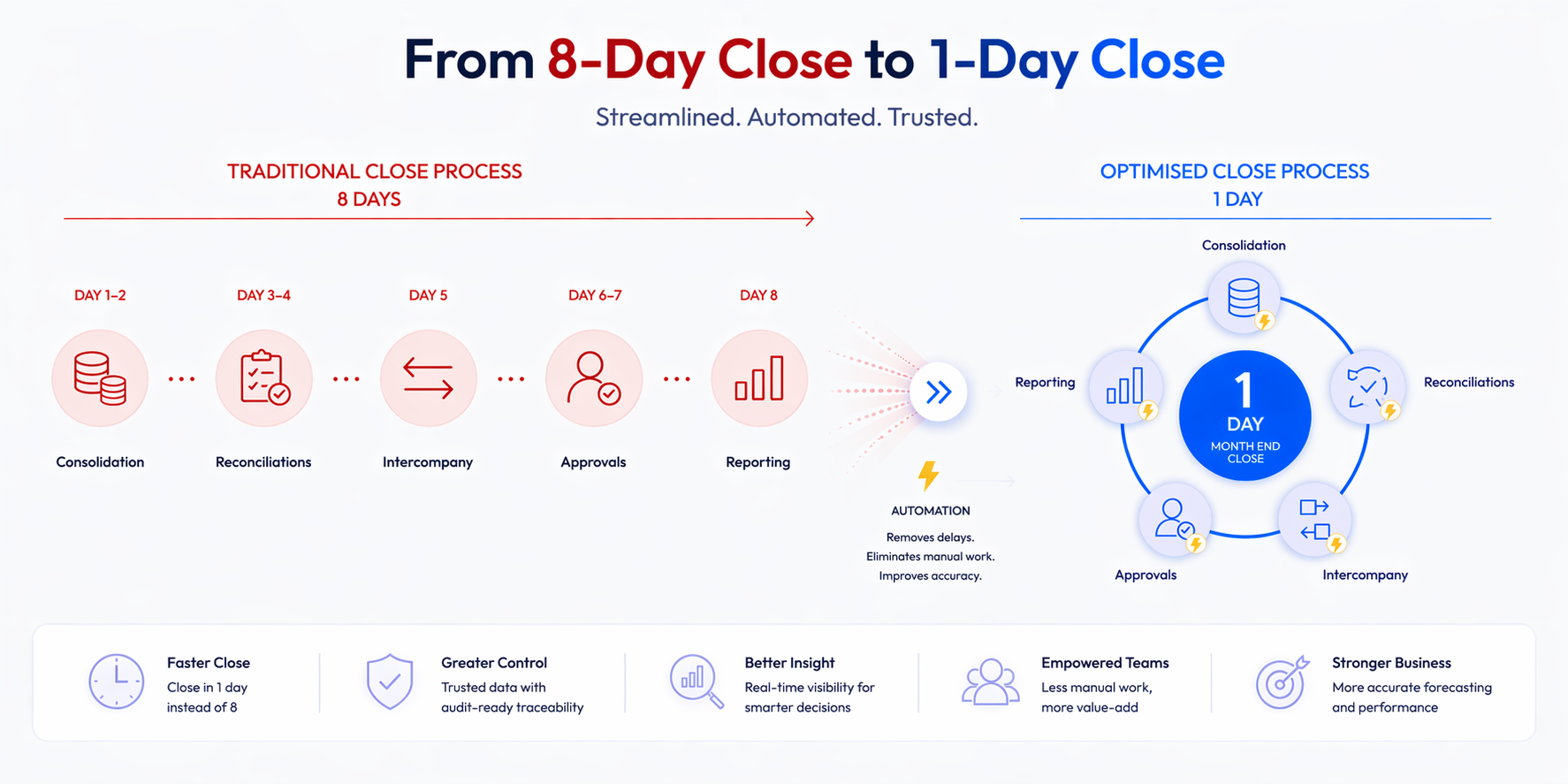
Example: Before vs After
Before:
- 8-day close
- 4 people involved
- Heavy spreadsheet use
After:
- 1-day close
- 1–2 people involved
- Automated reporting
How Can You Achieve a One-Day Month-End Close?
1. How do you standardise data?
You need:
- Consistent mappings
- Unified structures
- Defined reporting logic
This removes translation work (a key blocker to a one-day month-end close).
2. How do you automate key processes?
Focus on:
- Data extraction
- Reconciliations
- Report generation
Automation reduces manual effort enabling a one-day month-end close.
3. How do you enable real-time reporting?
Instead of waiting for month-end:
- Use live dashboards
- Track performance continuously
So by the time month-end arrives, most of the work is already done.
How Do You Actually Achieve a One-Day Month-End Close?
At this point, you might be thinking:
“This makes sense… but where do we even start?”
A jump from a 7 day close (if we’re being optimistic) to a 1 day close won’t happen overnight.
The good news is… it doesn’t have to.
Step 1: How do you identify what’s slowing your close down?
Start by mapping your current process.
Look at:
- Where data is exported
- Where manual adjustments happen
- Where delays or bottlenecks occur
- Where people are waiting on each other
Most teams are surprised by how much of their close is: “We’ve always done it this way” work
This is your biggest opportunity.
Step 2: How do you remove the highest-friction steps first?
You don’t need to fix everything at once.
Focus on:
- Repetitive reconciliations
- Manual data consolidation
- Report rebuilding
These are usually the biggest blockers to a one-day month-end close.
And they’re often the easiest to improve.
Step 3: How do you standardise your reporting logic?
This is where most transformation efforts fail. If:
- Each entity reports differently
- Each file uses different mappings
- Each person applies their own logic
Then no amount of automation will fix the problem.
To achieve a one-day month-end close, you need:
- One consistent data model
- One set of definitions
- One reporting structure
Step 4: How do you introduce automation without disruption?
Here’s a mistake many businesses make:
They try to “rip and replace” everything.
That’s not always the best option. From what we’ve seen, the most effective approach is:
- Build on your existing Microsoft stack
- Automate specific workflows first
- Improve incrementally
This is how you move towards a one-day month-end close without breaking your current process.
If you already have an ERP system, but are not satisfied with it, check out this blog!
Step 5: How do you make month-end easier before it begins?
The real shift happens when:
- Data is validated throughout the month
- Reports update automatically
- Issues are flagged early
With automated Power BI reports, you can avoid manual checks and errors and the reports that took days can be generated with just one click.

So What’s the Next Step?
If you’re serious about achieving a one-day month-end close, the most valuable thing you can do is:
Understand exactly where your current process is breaking down and what to fix first.
That’s exactly what we break down in our guide:
“How Finance Directors Can Get Control Back Through Visibility”
It walks through:
- Where most finance processes lose time
- How to identify hidden inefficiencies
- What a practical transformation roadmap looks like
Because getting to a one-day close isn’t about theory.
It’s about knowing where to start.
Key Takeaway
- A one-day month-end close is achieved before month-end begins
- Manual work and inconsistent data are the biggest blockers
- Automation and standardisation make it realistic
Quick Summary
A one-day month-end close is achieved by automating processes, standardising data, and enabling real-time reporting. It reduces manual effort, shortens reporting cycles, and improves finance efficiency.
FAQs
Is a one-day month-end close realistic?
Yes, but only with automation and structured processes.
What prevents faster month-end closes?
Manual processes, inconsistent data, and lack of integration.
How can finance teams reduce close time?
By standardising data, automating workflows, and using real-time reporting tools.